Hello IC artists. Welcome to my second installment of DE-KONSTRUCTED!
In this part, I reveal what my finished perspective line drawing looks like, and explain how to add receding areas of equal areas...
Once again, the purposes of DE-KONSTRUCTED are: 1) To show my art process, and; 2) To teach the elements of perspective art.
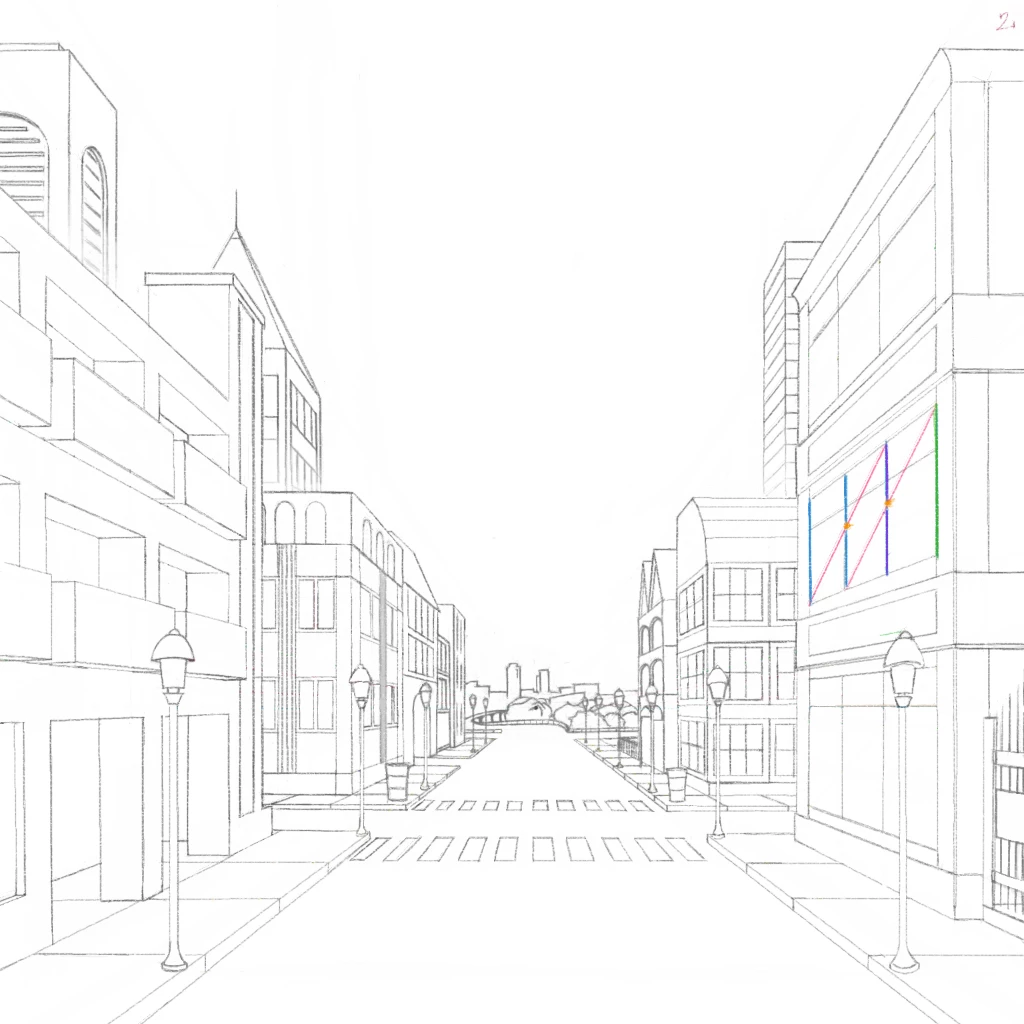
So, here you can see what my perspective drawing has turned into. Comparing it to my last draft, you can see how I etched detail into the
buildings and objects. To do this, I used a mathematical technique to give my receding objects the illusion of EQUAL SPACE...
I attempted to show you how to do this on the second-floor windows on the right side building.
1) Draw the height of the first item. In this case, the right edge of the windows. Shown here in GREEN.
2) Next, draw the second item where you think it looks right. Shown here in PURPLE.
3) Measure or eyeball where you think the HALFWAY POINT is on the second item. Mark that spot. Shown here in ORANGE.
4) Draw a line from the top of the first item through the halfway mark on the second item. Shown here in PINK.
5) This finds the position of the next item you want (window here). Draw that item. Shown here in BLUE.
6) Repeat as needed.
With this method, you can make all sorts of items of EQUAL AREAS receding away from you. I used this method on the windows, sidewalk,
lamp posts, and arches.
Thank you for taking the time to read all this. I hope you learned more about perspective art. See you next time when I add BASE COLOR to it
@desertrainbow 🌵 🌈 You are such a great teacher! 👍😁👍
COOL Professor Brian! I still want a front row seat in your class! I am one of your biggest fans! Say Hi to that gorgeous wife of yours! 😁
I think I will probably flunk this year! OUCH!👻😁👻
@upgraydd Aww. Thank you so much miss desertrainbow. What's your name? I need it for role call. 😀
Tammy....here!😁👻😁
@upgraydd Thanks Tammy. I will tell her. Stay safe.
can I have a hall pass please? need to go wash my hands!😁👻😁both of them!
@upgraydd Sure thing. If you want, we have gallons of hand sanitizer.
what the.....did you real draw this...?😱😱
@upgraydd Yep yep. It's not easy on this app. ArtFlow or ArtRage = so much easier. I'll color it next.
@👄Timi👄 this is truly phenomenal. thank you for sharing your magnificent talent and inspiring us all to grow our artistic talent
@👄Timi👄 I so want to color your draft teehee I only have a 2.5x3.0 screen on my phone that's why I created my pixel city for you to show
@👄Timi👄 I'm paying attention. thank you again for all your wonderful comments and support have a blessed evening Brian
Yes i love these apps😍😍
woah
wowwww! i cant wait to see all this masterpiece colored
WOW! impressive Brian!
I bet being in your class ROCKS!
its amazing art 🤩
😍 🎨 your talent makes me swoon ❤💕💜💓💖
Impressive to say the least! Thank you for sharing this knowledge. ❤
That was with your hand?
xss
stunning thank you for the class stay safe hugs
Amazing 😍 👏
@👄Timi👄 I try my best to put his instructions into pixels feel free to visit my gallery
@upgraydd You're welcome. And your pixel art is epic. Hang tight; I'll have a 'colorable' version available soon.
@upgraydd Thanks.
@upgraydd Hopefully, soon. I need to process this through another app and upload it so I can use smart borders. Soon... 😉
@~SHANIA~👑❤ yw
@upgraydd You're in my class. Does it rock? 😉
@upgraydd Thanks very much. This is part of an instructional series. Check out my gallery for more great art. 👍
@upgraydd You are my sun, my moon, my starlit sky. My inspiration, my motivation, and my density. 😄
@upgraydd You are so welcome. I love being generous with my knowledge. It's its own reward.
@upgraydd Yes. My hand, a good stylus, a ruler, and my tablet. Thanks for the comment. 😊
@upgraydd 😉
@upgraydd Thanks, you too.
@upgraydd Thank you Ms. Diva.
@desertrainbow 🌵 🌈 100% Professor Upgraydd! Shannon is married to a genius..
@•🔥•Nam.arts•🔥• ohk...😄😄
So different




Hello IC artists. Welcome to my second installment of DE-KONSTRUCTED!
In this part, I reveal what my finished perspective line drawing looks like, and explain how to add receding areas of equal areas...
Once again, the purposes of DE-KONSTRUCTED are: 1) To show my art process, and; 2) To teach the elements of perspective art.
So, here you can see what my perspective drawing has turned into. Comparing it to my last draft, you can see how I etched detail into the
buildings and objects. To do this, I used a mathematical technique to give my receding objects the illusion of EQUAL SPACE...
I attempted to show you how to do this on the second-floor windows on the right side building.
1) Draw the height of the first item. In this case, the right edge of the windows. Shown here in GREEN.
2) Next, draw the second item where you think it looks right. Shown here in PURPLE.
3) Measure or eyeball where you think the HALFWAY POINT is on the second item. Mark that spot. Shown here in ORANGE.
4) Draw a line from the top of the first item through the halfway mark on the second item. Shown here in PINK.
5) This finds the position of the next item you want (window here). Draw that item. Shown here in BLUE.
6) Repeat as needed.
With this method, you can make all sorts of items of EQUAL AREAS receding away from you. I used this method on the windows, sidewalk,
lamp posts, and arches.
Thank you for taking the time to read all this. I hope you learned more about perspective art. See you next time when I add BASE COLOR to it
@desertrainbow 🌵 🌈 You are such a great teacher! 👍😁👍
COOL Professor Brian! I still want a front row seat in your class! I am one of your biggest fans! Say Hi to that gorgeous wife of yours! 😁
I think I will probably flunk this year! OUCH!👻😁👻
@upgraydd Aww. Thank you so much miss desertrainbow. What's your name? I need it for role call. 😀
Tammy....here!😁👻😁
@upgraydd Thanks Tammy. I will tell her. Stay safe.
can I have a hall pass please? need to go wash my hands!😁👻😁both of them!
@upgraydd Sure thing. If you want, we have gallons of hand sanitizer.
what the.....did you real draw this...?😱😱
@upgraydd Yep yep. It's not easy on this app. ArtFlow or ArtRage = so much easier. I'll color it next.
@👄Timi👄 this is truly phenomenal. thank you for sharing your magnificent talent and inspiring us all to grow our artistic talent
@👄Timi👄 I so want to color your draft teehee I only have a 2.5x3.0 screen on my phone that's why I created my pixel city for you to show
@👄Timi👄 I'm paying attention. thank you again for all your wonderful comments and support have a blessed evening Brian
Yes i love these apps😍😍
woah
wowwww! i cant wait to see all this masterpiece colored
WOW! impressive Brian!
I bet being in your class ROCKS!
its amazing art 🤩
😍 🎨 your talent makes me swoon ❤💕💜💓💖
Impressive to say the least! Thank you for sharing this knowledge. ❤
That was with your hand?
xss
stunning thank you for the class stay safe hugs
Amazing 😍 👏
@👄Timi👄 I try my best to put his instructions into pixels feel free to visit my gallery
@upgraydd You're welcome. And your pixel art is epic. Hang tight; I'll have a 'colorable' version available soon.
@upgraydd Thanks.
@upgraydd Hopefully, soon. I need to process this through another app and upload it so I can use smart borders. Soon... 😉
@~SHANIA~👑❤ yw
@upgraydd You're in my class. Does it rock? 😉
@upgraydd Thanks very much. This is part of an instructional series. Check out my gallery for more great art. 👍
@upgraydd You are my sun, my moon, my starlit sky. My inspiration, my motivation, and my density. 😄
@upgraydd You are so welcome. I love being generous with my knowledge. It's its own reward.
@upgraydd Yes. My hand, a good stylus, a ruler, and my tablet. Thanks for the comment. 😊
@upgraydd 😉
@upgraydd Thanks, you too.
@upgraydd Thank you Ms. Diva.
@desertrainbow 🌵 🌈 100% Professor Upgraydd! Shannon is married to a genius..
@•🔥•Nam.arts•🔥• ohk...😄😄
So different