Hello IC! Welcome to the first pic in my D-KONSTRUCTED series. In this series, I will show you how to draw and color in 2 Point Perspective!
This serves dual purposes: 1. So you can see my art process in stages, and; 2. So you can learn perspective art.
You can see how my pics generally begin. It's pretty bare, basic. It's easy for artists to get discouraged and give up too early because
their pics don't resemble the finished products they admire. Remember: All pics start out this way, even the ones you love most.
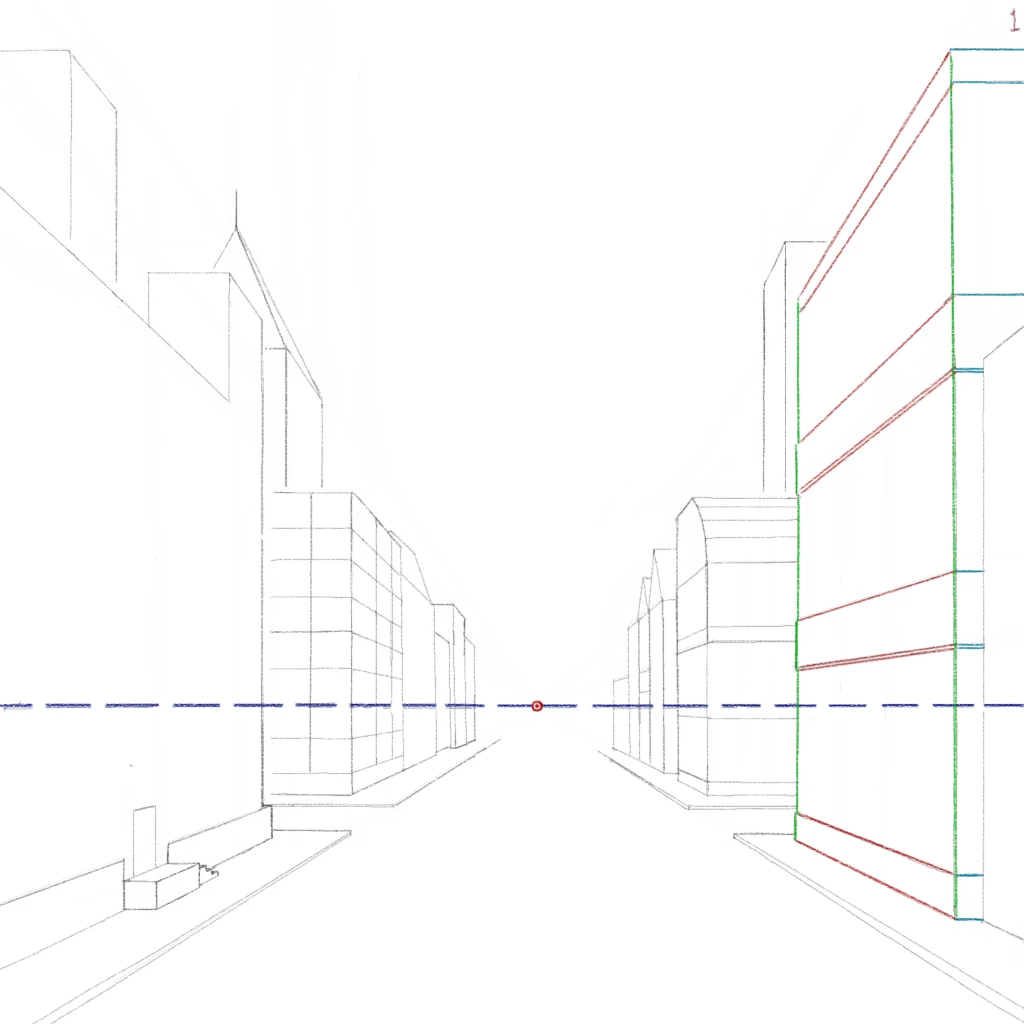
Every perspective piece will begin with a HORIZON LINE, shown here in dashed blue. This is eye level.
Next, and very importantly, mark a FOCAL POINT somewhere along the horizon line, shown here in red.
After that, your pic will generally include one of three types of lines. Rulers are definitely suggested, but not required.
1. HORIZONTAL LINES. These lines all run parallel to your horizon line. Shown here in light blue on the right-side building.
2. VERTICAL LINES. These lines will all run perpendicular (90°) to your horizon line. Shown here in green on the building.
3. RECEDING LINES. These are where most of your precision work will take place. These lines all end at, or point towards your focal point.
This is where a ruler would be handy. Because the more accurate your receding lines, the more you will give the illusion of depth.
And that is the basics of 1 Point Perspective! (Sorry for the typo in the first comment, it's ONE point perspective, not two...)
Join me soon for the next part of D-KONSTRUCTED, where I will show you how to add evenly-spaced objects and surfaces to your perpective art.
👏this is fantastic. thank you
thanks so much upgraydd!!
this is very cool can't wait to see you color this
woo!!
Wow Brian...I am sitting in the front row of your class..so I don't miss a thing! I will bring my lunch and thermos..okay?
@Laura Wilding thank you, very useful 💖
oh my godness how did you make this is just magical! i mean whoa this is perfection. are you an alien?!
@upgraydd You are very welcome.
@upgraydd No problem, dude.
@upgraydd Thanks. There are 1-2 more drawing drafts before I do color. If you like it now, just wait... 😃
@upgraydd Hey thanks. I guess when I'm not teaching, I'm finding other ways to teach! I just can't help it apparently. 😁
@upgraydd You're going to double woo when you see the next draft. I'm working on it now and I think you're going to like it.
@upgraydd Yep. And a ruler. These are a PITA without a simple ruler. Unless you have a real art app that makes lines for you. 😆
@upgraydd I am. I didn't want to tell anyone. But I won't lie... Yes, I am an alien, guilty as charged. Don't tell anyone, k?
@desertrainbow 🌵 🌈 so confuzing! I love it Brian!
I will also pack my 📏 ruler and compass too!
@upgraydd I just hate drawing lines with rulers. If this app modernized just a little bit, maybe they would have an auto-line...
@desertrainbow 🌵 🌈 you tell'em Brian! You should be the Incolor President! I will vote for you!
@Kenzie Cakes as far as straight lines go, on the kaleidoscope thing you can make a start and end point and it connects the two with a straight
solid point. ❤ didnt know about that until I was fiddling with it a few days ago!
just did a screenshot to show it because I realized it sounds confusing
@Tori💖 k, i'll try, mr alien ;)
@👄Timi👄 I got to admit. I've been playing with your instructions. this is awesome I feel like I'm in high school again lol you rock man
I want to draw with you please can you teach me bro plese
Nice lines !🖤🖤🖤
are we supposed to copy this Professor Brian?
forget it! you drew it! I tried! LMAO!😊
cool
We are very fortunate 😊Thank you so much 🙏💐
@M. Moonlightt I think that this app was created for people to color mandalas where you don't need to have lots of tools :/
Also, thank you for this amazing tutorial :D we won't go to school this two weeks so this way I can learn something new here
How do I use a ruler when I draw on smartphone? And without a digital pen? I tried this but it's hard with just my finger :c
@upgraydd Honestly, you don't. It's hard enough using a ruler with my big 12" tablet. I can't imagine using a phone. Not just for this
@upgraydd but for all my art. I'm super impressed with artists here who use a small phone and their finger. I honestly wouldn't have
@upgraydd the patience.
@upgraydd Good news is, this method is generally used by paper-and-pencil artists. It's immensely easier, too. Maybe try that way?
@upgraydd Also, if you choose to go the paper-and-pencil route, make sure you have a good eraser. You'll do A LOT of erasing.
Thank U 😘❤️
Absolutely fantastic ... just a celebration for me to learn drawing and painting techniques. Thank you dear❣❣❣
@Sharmane Woods Yep☝️ I use my finger and 📱small phone.🤷♀️
this is so cool. 🤘🏻 you are a natural at so many things... blessed and talented many times over. 😻😍 *swoon* I can't wait to see next 1
@👄Timi👄 Mr Brian I make a pixel using this perspective I dedicated it to you I really hope you like it I cant draw a straight line
thank u so much! this is great!
heloo please follow mee??😋😊😊😊😊😇😇😇
wooow aun mas impresionada que increíble diseño de arquitectura😍😍




Hello IC! Welcome to the first pic in my D-KONSTRUCTED series. In this series, I will show you how to draw and color in 2 Point Perspective!
This serves dual purposes: 1. So you can see my art process in stages, and; 2. So you can learn perspective art.
You can see how my pics generally begin. It's pretty bare, basic. It's easy for artists to get discouraged and give up too early because
their pics don't resemble the finished products they admire. Remember: All pics start out this way, even the ones you love most.
Every perspective piece will begin with a HORIZON LINE, shown here in dashed blue. This is eye level.
Next, and very importantly, mark a FOCAL POINT somewhere along the horizon line, shown here in red.
After that, your pic will generally include one of three types of lines. Rulers are definitely suggested, but not required.
1. HORIZONTAL LINES. These lines all run parallel to your horizon line. Shown here in light blue on the right-side building.
2. VERTICAL LINES. These lines will all run perpendicular (90°) to your horizon line. Shown here in green on the building.
3. RECEDING LINES. These are where most of your precision work will take place. These lines all end at, or point towards your focal point.
This is where a ruler would be handy. Because the more accurate your receding lines, the more you will give the illusion of depth.
And that is the basics of 1 Point Perspective! (Sorry for the typo in the first comment, it's ONE point perspective, not two...)
Join me soon for the next part of D-KONSTRUCTED, where I will show you how to add evenly-spaced objects and surfaces to your perpective art.
👏this is fantastic. thank you
thanks so much upgraydd!!
this is very cool can't wait to see you color this
woo!!
Wow Brian...I am sitting in the front row of your class..so I don't miss a thing! I will bring my lunch and thermos..okay?
@Laura Wilding thank you, very useful 💖
oh my godness how did you make this is just magical! i mean whoa this is perfection. are you an alien?!
@upgraydd You are very welcome.
@upgraydd No problem, dude.
@upgraydd Thanks. There are 1-2 more drawing drafts before I do color. If you like it now, just wait... 😃
@upgraydd Hey thanks. I guess when I'm not teaching, I'm finding other ways to teach! I just can't help it apparently. 😁
@upgraydd You're going to double woo when you see the next draft. I'm working on it now and I think you're going to like it.
@upgraydd Yep. And a ruler. These are a PITA without a simple ruler. Unless you have a real art app that makes lines for you. 😆
@upgraydd I am. I didn't want to tell anyone. But I won't lie... Yes, I am an alien, guilty as charged. Don't tell anyone, k?
@desertrainbow 🌵 🌈 so confuzing! I love it Brian!
I will also pack my 📏 ruler and compass too!
@upgraydd I just hate drawing lines with rulers. If this app modernized just a little bit, maybe they would have an auto-line...
@desertrainbow 🌵 🌈 you tell'em Brian! You should be the Incolor President! I will vote for you!
@Kenzie Cakes as far as straight lines go, on the kaleidoscope thing you can make a start and end point and it connects the two with a straight
solid point. ❤ didnt know about that until I was fiddling with it a few days ago!
just did a screenshot to show it because I realized it sounds confusing
@Tori💖 k, i'll try, mr alien ;)
@👄Timi👄 I got to admit. I've been playing with your instructions. this is awesome I feel like I'm in high school again lol you rock man
I want to draw with you please can you teach me bro plese
Nice lines !🖤🖤🖤
are we supposed to copy this Professor Brian?
forget it! you drew it! I tried! LMAO!😊
cool
We are very fortunate 😊Thank you so much 🙏💐
@M. Moonlightt I think that this app was created for people to color mandalas where you don't need to have lots of tools :/
Also, thank you for this amazing tutorial :D we won't go to school this two weeks so this way I can learn something new here
How do I use a ruler when I draw on smartphone? And without a digital pen? I tried this but it's hard with just my finger :c
@upgraydd Honestly, you don't. It's hard enough using a ruler with my big 12" tablet. I can't imagine using a phone. Not just for this
@upgraydd but for all my art. I'm super impressed with artists here who use a small phone and their finger. I honestly wouldn't have
@upgraydd the patience.
@upgraydd Good news is, this method is generally used by paper-and-pencil artists. It's immensely easier, too. Maybe try that way?
@upgraydd Also, if you choose to go the paper-and-pencil route, make sure you have a good eraser. You'll do A LOT of erasing.
Thank U 😘❤️
Absolutely fantastic ... just a celebration for me to learn drawing and painting techniques. Thank you dear❣❣❣
@Sharmane Woods Yep☝️ I use my finger and 📱small phone.🤷♀️
this is so cool. 🤘🏻 you are a natural at so many things... blessed and talented many times over. 😻😍 *swoon* I can't wait to see next 1
@👄Timi👄 Mr Brian I make a pixel using this perspective I dedicated it to you I really hope you like it I cant draw a straight line
thank u so much! this is great!
heloo please follow mee??😋😊😊😊😊😇😇😇
wooow aun mas impresionada que increíble diseño de arquitectura😍😍